Key takeaways:
- An SEO audit covers four areas: technical foundations, content, visibility on Google and in AI engines, and measurement.
- A crawl tool is only the starting point. The value is in deciding which findings actually matter.
- The deliverable is a prioritized list of findings, with a practical recommendation for each.
- What we need from you: view access to Search Console and GA4, and a conversation about your business and customers.
- Some checks you can do yourself in an hour, with Google’s free tools.
Why audit your site at all
A site can look great and still bring in no leads from search. The reason is usually invisible: pages that aren’t indexed, service pages that don’t answer what people search for, measurement that doesn’t count leads, or competitors taking your place in the answers on Google and ChatGPT.
An SEO audit brings all of this together. Instead of guessing what to improve, you get a picture of where things stand today and a list of what to fix first.
What we check
| Area | What we check | Example finding |
|---|---|---|
| Technical foundations | Crawling, indexing, robots.txt, sitemap, redirects, duplicate pages, speed, mobile | 12 service pages with a noindex tag left over from development |
| Content | Whether each service has its own page, whether it answers customer questions, titles and descriptions, internal links | One page trying to rank for five different services |
| Search visibility | What ranks today and where, who the competitors are for each query, pages close to page one | 4 pages at position 9-14 with thousands of monthly impressions |
| Visibility in AI engines | What ChatGPT, Gemini and Google show about the business, and which sources they cite | ChatGPT recommends competitors via a comparison site you’re not listed on |
| Measurement | GA4, lead events, traffic sources, connection to Search Console | The contact form isn’t tracked, so there’s no way to know what search brings in |
The last area matters more than it seems. Without proper measurement, there’s no way to know whether the improvements after the audit worked.
How it works
- Intro call. We learn what the business sells, to whom, and what counts as a good lead. Without this, there’s no way to know what matters to check.
- Access. View access to Search Console and GA4. If you run ad accounts, those too.
- Crawl and data collection. We crawl the site the way Google does and pull performance data from Search Console.
- Analysis. We check each finding against the data: does it affect pages that bring in, or could bring in, leads.
- Presentation and plan. We go through the findings and the order of work together, and decide who does what.
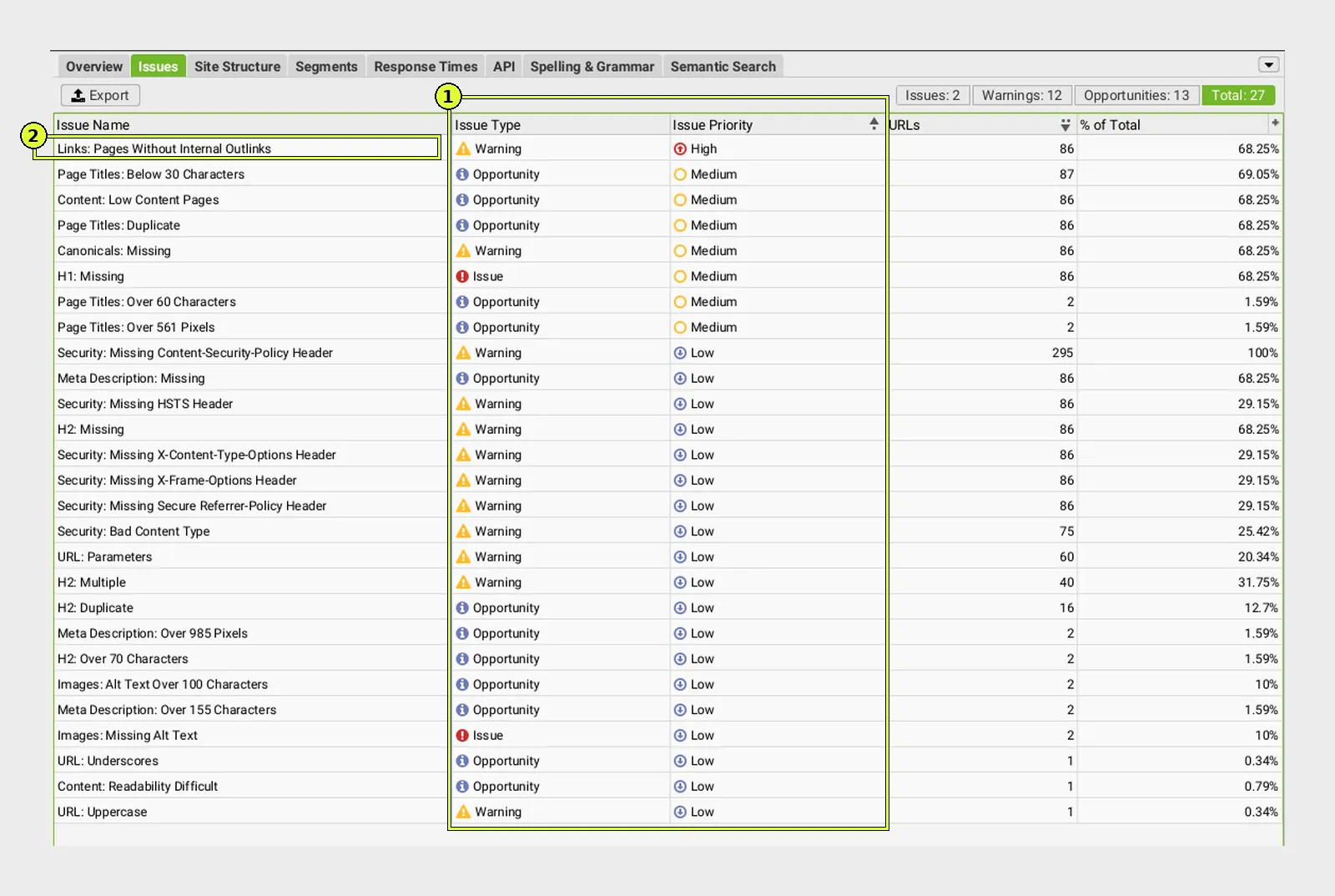
A crawl tool usually finds dozens of “issues”. Most of them affect nothing, and a few are critical. The difference between a tool’s list and a professional audit is deciding which of them matter to your business.
What you get at the end
- A snapshot. How many pages are indexed, what brings in traffic and leads, and where you stand against competitors.
- A list of findings. Each finding with a short explanation, why it matters, and which pages it affects.
- Priorities. What to fix this week, this month, and what can wait. The order is set by impact on leads, not by technical severity.
- Implementation notes. Exactly what to change, in language a developer or writer can work with.
- A wrap-up call. We go through everything together and agree on next steps.
The audit stands on its own. You can implement the recommendations yourselves or with any provider, with no commitment to continue.
What you can check yourself in an hour
- In Search Console, in the Pages report: how many pages aren’t indexed, and for what reasons. We cover the common reasons in Why Isn’t My Site on Google?.
- In the Performance report: the 20 queries with the most impressions, and the average position of each.
- URL Inspection on your most important service page: is it indexed.
- In GA4: is there an event for a lead (form, phone, WhatsApp), and does it count correctly.
- One question to ChatGPT and to Google: “Which [your field] company do you recommend in [your city]?”. Who appears, and who doesn’t.
If one of these checks raises a question you can’t answer, that’s exactly where a professional audit is worth the time. We cover the SEO process itself in our Organic SEO guide.
Frequently asked questions
How long does an SEO audit take?
For a site with tens to hundreds of pages, usually one to two weeks from the moment we have access to Search Console and GA4. A large site or a store with thousands of products takes longer.
What’s the difference between an SEO audit and an automated audit tool?
An automated tool finds technical issues and ranks them by fixed rules. A professional audit decides which of them actually affect your business, adds what a tool can’t see (content, search intent, competitors, measurement), and turns it all into a plan.
Do we need to give access to the site itself?
Usually not. View access to Search Console and GA4 is enough. Site access is only needed if you want us to check internal settings, such as your SEO plugin.
What do we do with the findings?
You can implement them yourselves, with your developer or writer, or with us. Each finding is written as a clear task.
How often should a site be audited?
A full audit once a year, and after every major change: a redesign, a platform migration or a domain change. In between, a monthly look at Search Console is enough.
Sources: SEO Starter Guide, Google Search Central · Page indexing report, Search Console Help · Do you need an SEO?, Google Search Central.
Want to know what’s holding your site back?
In an SEO audit, we go through your technical foundations, content, visibility on Google and in AI engines, and measurement, and turn the findings into a clear work plan. You can carry it out yourselves, with your developer or with us.