
Key takeaways:
- Test with 20 questions your customers actually ask, not with your business name.
- Run them in a temporary chat or logged out, so your own history doesn’t shape the answer.
- For each question, record whether you were mentioned, who was mentioned instead, and which sources were cited.
- Answers change from run to run, so look at your mention rate across all 20 questions, not at a single answer.
- Repeat the same questions once a month and compare.
Why check at all
On Google you know where you rank, and Search Console shows it to you. ChatGPT has no such report. There’s nowhere to see how often your business was mentioned, next to whom, or in what context. The only way to know is to ask.
The check answers three questions:
- Do AI engines know your business, and do they describe it correctly?
- Do they recommend it when asked about your category, without being given your name?
- Where do they get their information: your site, comparison sites, articles or competitors?
The answer to the third question matters most, because it shows you where to work. We explained what GEO is and how it works in What Is GEO?.
Setting up the check
Pick the engines. ChatGPT is the main one. Add Gemini and Google’s AI results (AI Overviews or AI Mode), since that’s where most searches happen. Three engines are enough to see the picture.
Neutralize your history. If you’re logged in to ChatGPT and have talked to it about your business, it may mention you just because of that. So run the questions in a Temporary Chat, or in a private browser window without logging in. On Google, use a private window.
Write questions the way a customer would. A customer doesn’t type “plumber Austin”. They type “My ceiling is leaking, how do I find a reliable plumber who won’t overcharge me?”. Ask your sales or support team what customers ask on the phone, and use their words.
Download the sheet. It includes 20 ready rows for the questions, columns for each engine, and a summary tab that calculates your mention rate for you.
The 20 questions
Replace [category], [city] and [business name] with your own details. The questions are split into 5 groups, because each group tests something different.
Recommendations (without your name)
- Which [category] company do you recommend in [city]?
- Who are the best providers of [service] in [country]?
- I need [service] for a small business. Who should I look at?
- Give me 3 options for [service] with pros and cons.
The problem the customer is trying to solve
- [The problem in a customer’s words], what should I do?
- How do I find a reliable [professional] for [problem]?
- Should I do [task] myself or hire someone?
- What’s the fastest way to [the outcome the customer wants]?
Price and comparison
- How much does [service] cost in [country]?
- What’s the difference between [type A] and [type B] of [product or service]?
- What should I check before hiring [service]?
- What are the common mistakes when choosing a [provider in your field]?
Local and niche
- [Service] near me in [neighborhood or city].
- [Service] available on weekends or for emergencies.
- [Service] for [a specific audience, such as offices or clinics].
- [Service] with [a feature that sets you apart, such as a warranty or a specialty].
About the business itself
- What do you know about [business name]?
- What do people say about [business name]? Are there reviews?
- [Business name] or [main competitor]: which is better?
- How much does [service] cost at [business name]?
Questions 1-16 test whether you get recommended. Questions 17-20 test whether you’re described correctly. If your business isn’t local, swap the local group for more questions from the problem group.
Running and recording
- Open a new chat for each question. Earlier questions in the same chat affect the answer.
- Paste the question from the sheet exactly as written, without changing a word. That lets you compare month to month.
- Record in the sheet: whether you were mentioned (yes / no), where you appeared in the list, which competitors were mentioned, and which sources were cited.
- For questions 17-20, also record whether the description is accurate: services, area, prices and opening hours.
- Save a screenshot of every answer that mentions you, and of every inaccurate description.
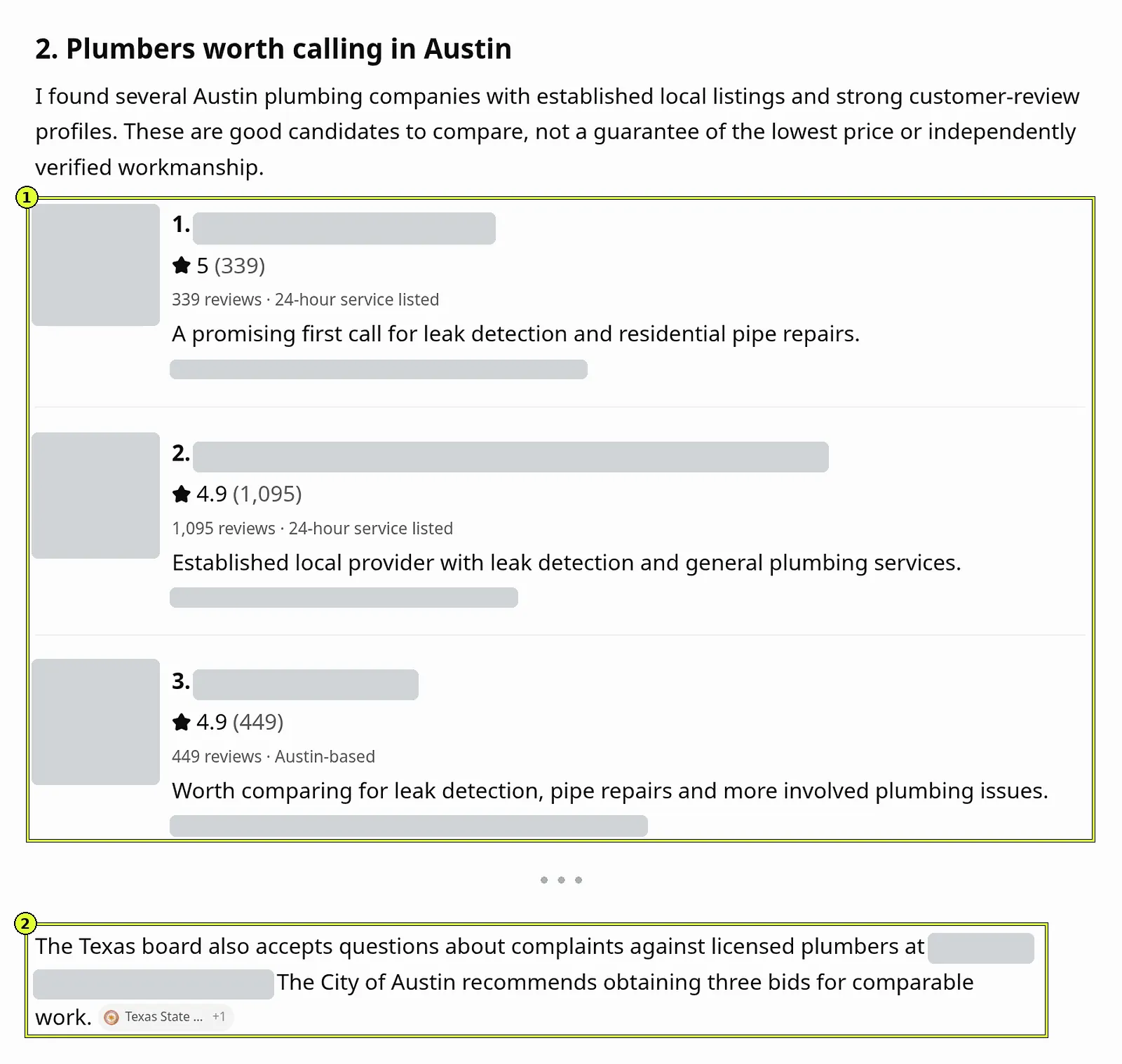
An answer that changes isn’t a glitch. AI engines generate a fresh answer every time, and the same question can return a different list twenty minutes later. For questions 1-4, the most important ones, run each question twice and record both answers.
How to read the results
The summary tab in the sheet calculates how many of questions 1-16 mentioned you, for each engine separately.
| Result | What it means | What to do |
|---|---|---|
| Not mentioned at all, and in questions 17-20 the engine doesn’t know you | There isn’t enough information about the business online | Start with the foundations: a site that’s crawled and indexed, a business profile, detailed service pages |
| Known in questions 17-20, but not recommended | The engine knows you exist, but other sources are more convincing | Check which sources are cited for competitors, and make sure you’re in them |
| Recommended in some of the questions | You have a presence, but not on every topic | Find the question group where you’re missing, and write a page that answers those questions |
| Mentioned, but with wrong information | The engine is pulling from an outdated or inaccurate source | Find the source and get it corrected, and update the details on your site and business profile |
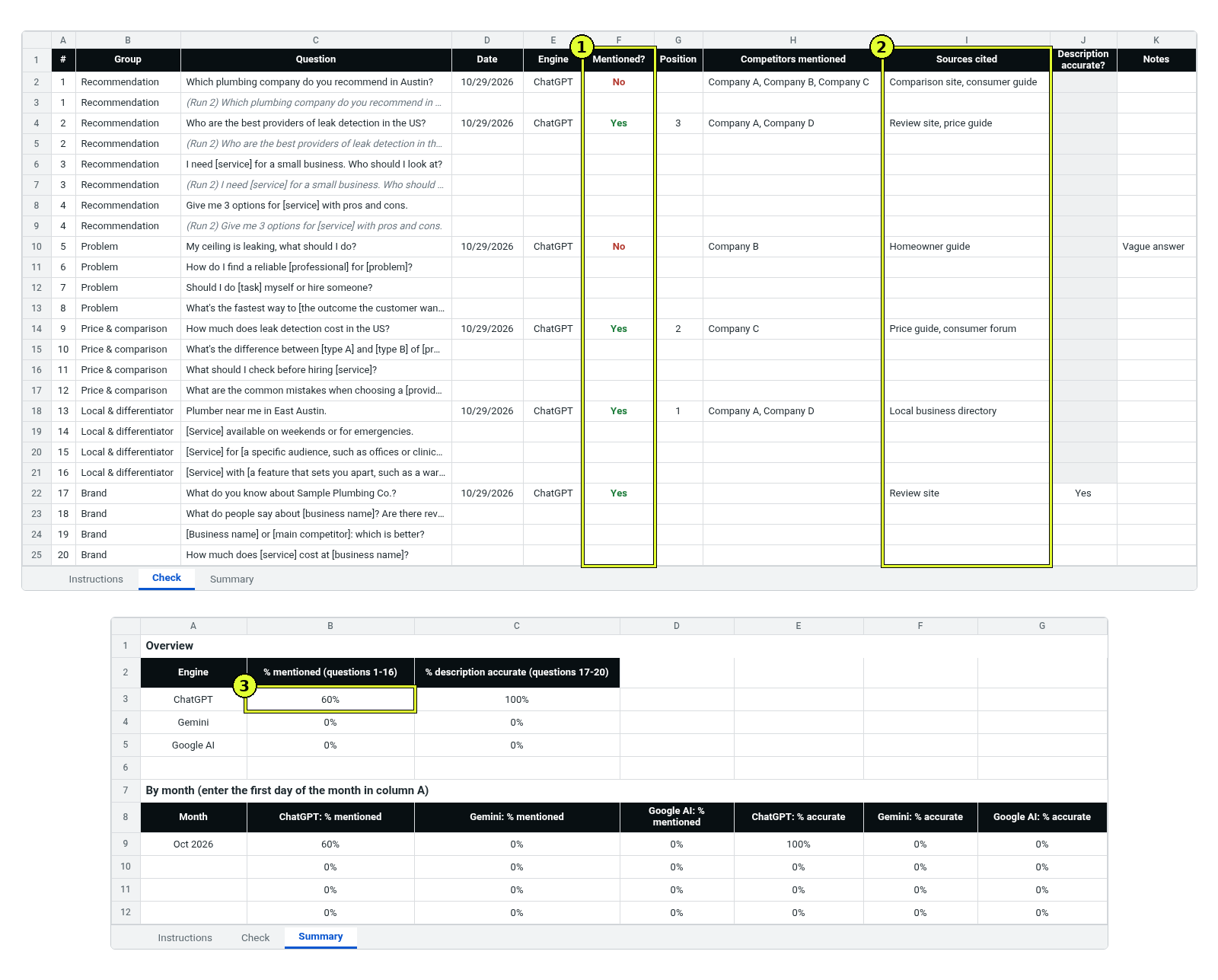
The most useful column in the sheet is the sources. If the same comparison site, article or vendor directory shows up in many answers, it shapes what the engine says about your category. That’s where you want to be.
What to do with the results
- Fix wrong information about the business first, because it drives customers away even when you are mentioned.
- Make sure the site is indexed on Google, and that every service has a page with prices, service area and FAQs.
- Answer the price and comparison questions on your site, because that’s usually where engines cite other sources.
- Work on being present in the sources that keep showing up in your sheet: reviews, articles and vendor directories.
- Run the check again in a month, with exactly the same questions.
Search Console also has a report showing impressions in Google’s AI features. It complements the manual check, but doesn’t cover ChatGPT or Gemini.
Frequently asked questions
Why not just ask ChatGPT whether it knows my business?
Because customers don’t ask that way. They ask about the category and pick from the list they get. That’s why 16 of the 20 questions don’t include the business name.
My business shows up when I ask, but not when a friend asks. Why?
The engine probably knows you from your own conversations. Testing in a temporary chat, or logged out, shows what someone else sees.
How often should I check?
Once a month is enough. Checking daily mostly shows noise, because the answers change even when nothing changes on your side.
Can I pay to appear in the answers?
Not in the organic answers themselves. Anyone who promises you a spot in ChatGPT’s answers is promising something they don’t control. We cover this and other red flags in How to Choose a GEO Agency.
If I rank well on Google, do I automatically show up in ChatGPT?
Not always. Strong rankings raise the odds, but AI engines lean heavily on comparison sites and outside sources. The foundation is still sound organic SEO.
Sources: Temporary Chat FAQ, OpenAI Help Center · ChatGPT search, OpenAI Help Center · AI features and your website, Google Search Central.
Want us to run the check for you?
In a visibility audit, we run the questions your customers ask in ChatGPT, Gemini and Google, compare you to competitors, and show which sources shape the answer. You get a clear list of what to fix first.